


The best and simpliest method to connect your Samsung Galaxy Ace Phone to a car audio-system without AUX IN or USB is to stream a signal to your radio with an FM Transmitter.
All it takes is to connect your phone to this FM Transmitter via a standard Jack connector. Please take in account that the transmitter just forwards the sound to your radio. That means that you will get by default the same sound quality as your Galaxy Ace is able to play. Which is usually not comparable with a high-end car audio-system. You will need to enhance / correct what you hear through the audio settings of your car radio.
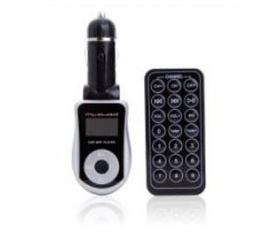
Since I have no experience how a good FM Transmitter should sound when you just stream the sound from USB or from the phone I decided to keep the ball low for the first time and bought a cheaper one around 10 Euros : MY AUDIO CAR MP3 PLAYER C100
The manual - or to be more exact : the small sheet of paper with 8 lines of text on it - lists the functions. You should be able to specify a frequency wich will be recognized by your radio tuner. You can connect a phone or another device thorugh the Jack connector or you can connect a USB device or stick. The FM Transmitter comes with a remote-control where pre-programed equalizer functions are available such as Pop, Rock , Jazz etc.
Further folder navigations and playlist settings are availble ( random , single etc. ).
Lets see the impressions this little device has left in the every day use :
Further folder navigations and playlist settings are availble ( random , single etc. ).
Lets see the impressions this little device has left in the every day use :
MY AUDIO CAR MP3 PLAYER C100
Specifications
Display
Slots
Connectors
Controls
Chanels
Transmitter
Power
Supported
Slots
Connectors
Controls
Chanels
Transmitter
Power
Supported
LCD
USB , SD Card
Jack Connector Line In , Car Charger
Keys on the device , Enhanced options are provided via the Remote
Control ( comes with battery )
206
FM Transmitter
12/24 V
MP3
USB , SD Card
Jack Connector Line In , Car Charger
Keys on the device , Enhanced options are provided via the Remote
Control ( comes with battery )
206
FM Transmitter
12/24 V
MP3
Usability
The Remote Control is really cheap style and some functions can just be reached via RC. To change the sound settings by pressing these worse buttons can is no fun. The display has a blue illumination and the informations are clearly displayed. This transmitter just supports simple class USB sticks. A stick with virtual partitions - such as private/secure and public partitions will be receipted as No Device . So just use a simple USB stick. If you put a wide range of music in the root of your USB device the random function provides some enjoyment but do not expect too much ....
Summary
I think even for this price you can get better ones. The quality of the sound this transmitter provides definitely needs to be enhanced / corrected by your car's audio-system. Connecting the Galaxy Ace via the Jack connector sounds like the phone is far away and resides in the trunk of your car. The RC is so cheap quality that you need to push the buttons hard to get an effect - even if its new.
I just can recommend not to buy this transmitter ! You'll get a device that theoretically provides fun but is practically just able to give you enjoyment on the lowest level.
I just can recommend not to buy this transmitter ! You'll get a device that theoretically provides fun but is practically just able to give you enjoyment on the lowest level.
Overall Rating : 2/10


